
PNG·JPEG·WEBP 비교: 사진·스크린샷·로고로 직접 변환해 본 결과
이미지를 저장할 때 형식을 고르는 기준은 "어떤 게 제일 좋다"가 아니라 이미지 안에 무엇이 들어 있느냐입니다. 사진, 글자가 많은 화면 캡처, 투명 배경 로고는 같은 설정으로 저장해도 결과가 전혀 다르게 나옵니다. 이 글은 세 종류의 이미지를 이 사이트의 이미지 변환기와 같은 방식으로 PNG·JPEG·WEBP로 저장해 보고, 용량과 화질을 직접 비교한 기록입니다.
먼저 결론
- 사진을 웹에 올리거나 메신저로 보낼 때는 WEBP 85%가 가장 효율적이었습니다. 같은 품질값의 JPEG보다 38% 작았고 화질 수치는 거의 같았습니다.
- 글자가 있는 화면 캡처도 WEBP가 JPEG보다 작고 깨끗했습니다. 다만 다시 편집하거나 설명서에 그대로 넣을 원본은 PNG로 보관하세요.
- 투명 배경 로고는 PNG 또는 WEBP로 저장해야 합니다. JPEG는 투명한 부분을 흰색으로 채웁니다.
- WEBP를 받지 않는 프로그램이나 업로드 양식에 낼 때만 JPEG를 쓰면 됩니다.
상황별로 고르는 표
| 용도 | 추천 형식 | 이유 |
|---|---|---|
| 블로그·쇼핑몰 상품 사진 | WEBP 85% | 사진에서 용량 대비 화질이 가장 좋았음 |
| WEBP를 받지 않는 게시판·관공서 양식 | JPEG 85% | 거의 모든 프로그램이 열 수 있음 |
| 설명서·보고서용 화면 캡처 | PNG (원본 보관) | 글자 테두리가 원본 그대로 남음 |
| 웹페이지에 올릴 화면 캡처 | WEBP 85% | PNG의 약 1/12 용량, JPEG보다 글자 번짐 적음 |
| 투명 배경 로고·아이콘 | PNG 또는 WEBP | JPEG는 투명도를 저장하지 못함 |
| 사진 원본 장기 보관 | 카메라 원본 그대로 | 변환할 때마다 메타데이터·화질이 달라질 수 있음 |
어떻게 시험했나
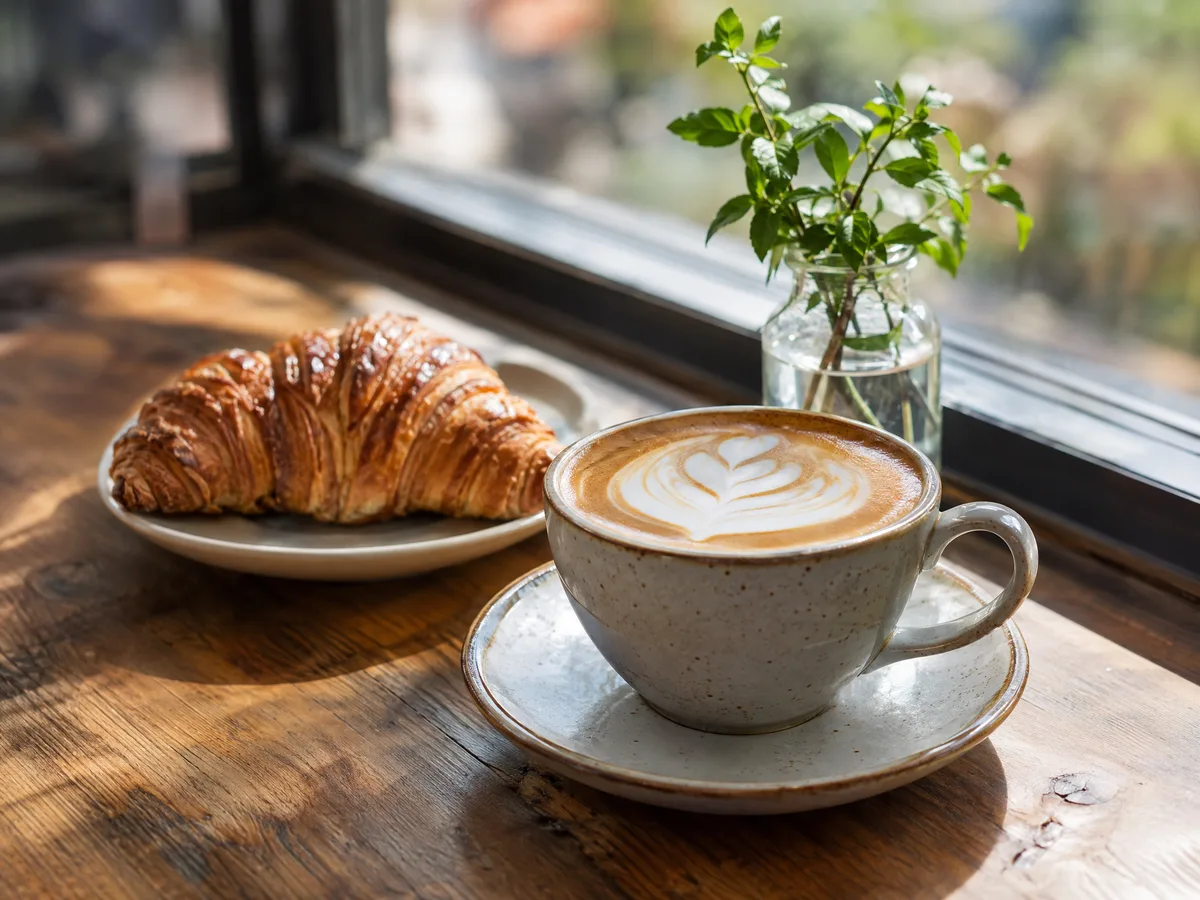
시험용 원본은 세 가지입니다. ① 시험용으로 생성한 2048×1536 사진형 이미지(나뭇결, 우유 거품, 흐린 배경이 섞여 있음), ② 이 사이트의 문의 페이지를 1024×768로 실제 캡처한 화면, ③ 가장자리와 그림자가 반투명한 1024×1024 투명 로고입니다.
변환은 이미지 변환기와 똑같이 브라우저의 canvas 인코더로 했습니다. 크기 조절과 배경 제거는 끄고, JPEG·WEBP는 도구의 세 단계(70%·85%·95%)로 각각 저장했습니다. JPEG는 도구와 마찬가지로 흰 배경 위에 합성한 뒤 저장했습니다. 측정 환경은 2026년 9월, Windows의 Chromium 152입니다.
화질은 PSNR로 비교했습니다. 원본 PNG와 픽셀 값이 얼마나 다른지를 dB로 나타낸 값으로, 높을수록 원본에 가깝습니다. 보통 40dB 안팎부터는 화면에서 차이를 찾기 어려운 경우가 많지만 사람 눈의 판단과 항상 일치하지는 않으므로, 아래 확대 그림과 함께 보세요. 용량의 KiB는 1024바이트 단위입니다.
결과 1 — 사진: WEBP가 가장 효율적
| 형식 | 용량 | PSNR |
|---|---|---|
| PNG | 5,808.9 KiB | 원본 |
| JPEG 70% / 85% / 95% | 261.3 / 391.1 / 726.1 KiB | 38.6 / 40.9 / 44.1 dB |
| WEBP 70% / 85% / 95% | 144.4 / 241.8 / 559.4 KiB | 37.8 / 40.5 / 44.4 dB |
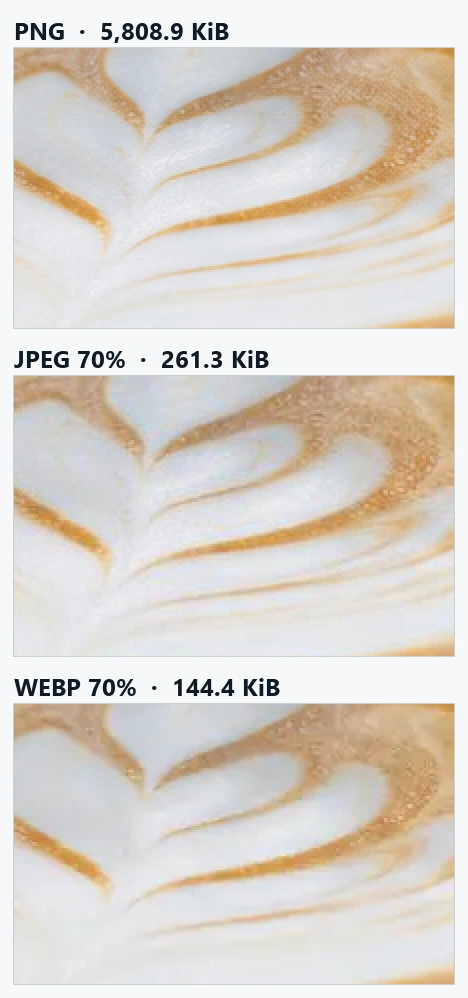
PNG는 5.8MB로, 사진에는 쓸 이유가 거의 없습니다. WEBP 85%는 PNG의 1/24 크기였고, 같은 85%의 JPEG(391.1 KiB)보다 38% 작으면서 PSNR은 0.4dB 차이였습니다. 70%에서도 WEBP가 JPEG의 절반 조금 넘는 크기였습니다.
확대해 보면 두 형식이 손실을 내는 방식이 다릅니다. JPEG는 8×8 블록 단위로 압축해서 거품의 작은 알갱이가 네모지게 뭉개지고, WEBP는 결을 매끈하게 지워 버리는 쪽입니다. 100% 크기로 볼 때는 둘 다 차이를 찾기 어려웠습니다. 음식·제품 사진처럼 질감이 중요한 사진을 크게 보여줄 계획이라면 85% 이상을 권합니다.
결과 2 — 글자가 있는 화면 캡처: JPEG의 번짐이 가장 잘 보임
| 형식 | 용량 | PSNR |
|---|---|---|
| PNG | 300.9 KiB | 원본 |
| JPEG 70% / 85% / 95% | 41.1 / 55.1 / 86.7 KiB | 38.3 / 41.6 / 44.4 dB |
| WEBP 70% / 85% / 95% | 20.1 / 26.0 / 40.6 KiB | 40.9 / 43.2 / 44.5 dB |
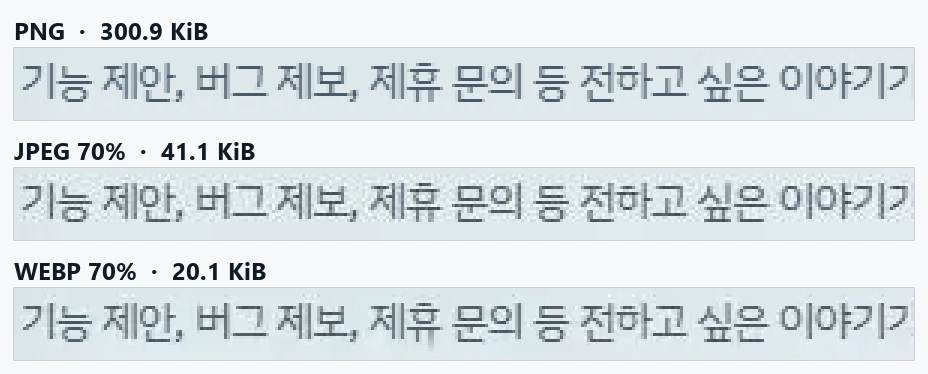
사진과 달리 캡처 화면에서는 WEBP가 모든 품질 단계에서 JPEG보다 작고 PSNR도 높았습니다. WEBP 85%(26.0 KiB)는 JPEG 85%(55.1 KiB)의 절반 이하 크기인데 수치는 더 좋았습니다. JPEG는 색이 급격히 바뀌는 글자 테두리에 약해서, 확대하면 글자 주변에 흐린 얼룩이 생깁니다.
그래도 PNG가 필요한 경우가 있습니다. 설명서에 넣은 캡처를 나중에 잘라 쓰거나 표시를 덧그릴 예정이라면, 손실 형식으로 저장할 때마다 얼룩이 누적됩니다. 원본은 PNG로 두고 웹에 올릴 사본만 WEBP로 만드세요. 참고로 이 캡처는 배경에 반투명 효과와 그라데이션이 있어서 PNG가 300 KiB였습니다. 흰 바탕에 글자만 있는 캡처라면 PNG가 훨씬 작아집니다.
결과 3 — 투명 로고: JPEG는 흰 사각형이 생김
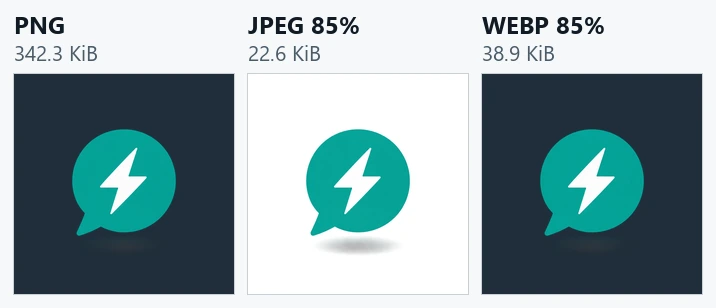
JPEG에는 투명도를 저장하는 칸이 없어서, 이 도구는 투명한 부분을 흰색으로 채워 저장합니다. 흰 배경 웹페이지에서는 티가 나지 않다가 어두운 배경이나 색 있는 배너에 올리면 흰 사각형이 드러납니다. 반투명한 그림자도 회색 덩어리로 굳습니다.
여기서는 WEBP 85%(38.9 KiB)가 JPEG 85%(22.6 KiB)보다 컸습니다. WEBP는 투명도 정보까지 함께 저장하기 때문이고, 이 차이는 결함이 아니라 기능의 대가입니다. PNG는 342.3 KiB였지만 로고처럼 다시 편집하거나 여러 곳에 쓸 원본이라면 PNG가 가장 안전합니다. 웹페이지에 싣는 사본만 WEBP로 바꾸면 됩니다.
품질 70%·85%·95%는 어떻게 고를까
숫자를 올릴수록 용량이 빠르게 늘어납니다. 사진 JPEG는 95%가 70%의 2.8배였지만 PSNR 증가는 5.5dB였습니다. 대부분의 경우 85%가 무난한 기준입니다.
- 70%: 메신저로 보내는 사진, 목록의 작은 썸네일처럼 작게 보이는 이미지
- 85%: 블로그·상품 상세 페이지 등 일반적인 웹 게시
- 95%: 인쇄소나 다른 편집자에게 넘길 중간 파일. 가능하면 원본을 그대로 넘기는 편이 더 좋습니다
품질 85%는 "원본 화질의 85%가 남는다"는 뜻이 아니라 인코더에 전달하는 설정값입니다. 형식이 다르면 같은 숫자라도 결과 화질이 같지 않습니다.
자주 하는 실수
- JPEG를 PNG로 바꾸면 화질이 좋아진다고 생각하기: 이미 잃은 정보는 돌아오지 않고 용량만 커집니다.
- JPEG를 열어 수정하고 다시 JPEG로 저장하기를 반복하기: 저장할 때마다 손실이 쌓입니다. 작업 중에는 PNG로 저장하고 마지막에 한 번만 변환하세요.
- 투명 로고를 JPEG로 저장하기: 흰 배경이 생깁니다.
- 움직이는 GIF를 변환하기: 이 도구는 첫 장면 하나만 정지 이미지로 저장합니다. 움직임을 살리려면 비디오 변환기에서 MP4나 WEBM으로 바꾸세요.
- WEBP를 아무 데나 올리기: 오래된 프로그램이나 일부 업로드 양식은 WEBP를 받지 않습니다. 거부되면 JPEG로 다시 저장하세요.
이 도구의 동작과 한계
입력 이미지를 브라우저에서 그린 뒤 다시 저장하므로 촬영 날짜·위치·색 프로필(EXIF·ICC) 같은 메타데이터가 유지된다고 보장하지 않습니다. 사진 원본은 따로 보관하세요. SVG를 PNG 등으로 저장하면 확대해도 선명한 벡터가 아니라 픽셀 이미지가 됩니다. BMP 출력도 투명도를 흰색으로 채우며 용량이 큽니다.
배경 제거는 가장자리와 연결된 비슷한 색을 지우는 방식이라 흰 배경 위 단색 로고에 잘 맞습니다. 피사체가 배경과 같은 색이거나 사진 배경이 복잡하면 필요한 부분까지 사라질 수 있습니다. 사람·머리카락을 인식하는 AI 분리 기능은 아닙니다.
위 수치는 이 세 원본과 Chromium 152 인코더의 결과입니다. 브라우저 종류와 버전, 원본 내용에 따라 용량 순위가 달라질 수 있으니, 중요한 이미지는 도구에서 직접 세 형식으로 저장해 비교해 보세요.