
Video to GIF
Turns a chosen part of a video into a GIF. Set the crop, width, fps, colours and speed while watching the size estimate.
GIF is limited to 256 colours, so it is far heavier than video. Start with a short clip. Conversion time and the size you can handle depend on your device.
Measured file sizes by setting
We made GIFs from the same 5-second section of two very different videos (both 1280×720, 30 fps, 10 seconds) with this tool: ① a photo slowly zooming and panning so the whole frame keeps moving, and ② a screen-recording-style clip of a text-heavy web page that scrolls once. Times come from Chromium running automatically on Linux and will differ on your device.
| Video | Setting | Output size | Frames | File size | Time |
|---|---|---|---|---|---|
| ① Photo pan | Light (320 px · 10 fps · 128 colours · pattern) | 320×180 | 50 | 1,370.9 KiB | 5.3 s |
| ① Photo pan | Standard (480 px · 12 fps · 256 colours · smooth) | 480×270 | 60 | 5,045.7 KiB | 5.7 s |
| ① Photo pan | Sharper (640 px · 15 fps · 256 colours) | 640×360 | 75 | 10,734.2 KiB | 8.3 s |
| ① Photo pan | Standard + 1:1 crop | 480×480 | 60 | 8,574.7 KiB | 7.3 s |
| ② Screen recording | Light | 320×180 | 50 | 225.9 KiB | 0.6 s |
| ② Screen recording | Standard | 480×270 | 60 | 446.2 KiB | 0.8 s |
| ② Screen recording | Sharper | 640×360 | 75 | 810.1 KiB | 1.0 s |
With the same standard setting, the photo pan came out about 11 times larger than the screen recording. A GIF only re-stores what changed since the previous frame, so when the whole picture moves it has to store almost every frame in full. That is why the tool shows the estimate as an upper limit before your first conversion; once you have made one, it recalculates from that video's real result.
Colours and dithering
A GIF can use at most 256 colours per image, so missing colours are imitated by mixing nearby colours as dots (dithering). These are the results for the same 5-second section at 480 px and 12 fps when only the colours and dithering change.
| Setting | ① Photo pan | ② Screen recording | Visible difference |
|---|---|---|---|
| A. 256 colours · smooth | 5,045.7 KiB | 446.2 KiB | Most natural gradients |
| B. 256 colours · pattern | 4,281.6 KiB (−15%) | 541.9 KiB (+21%) | Regular grid texture up close |
| C. 256 colours · off | 4,129.7 KiB (−18%) | 439.2 KiB (−2%) | Stepped colour bands on smooth areas |
| D. 64 colours · smooth | 3,464.1 KiB (−31%) | — | Coarser dots, duller colours |
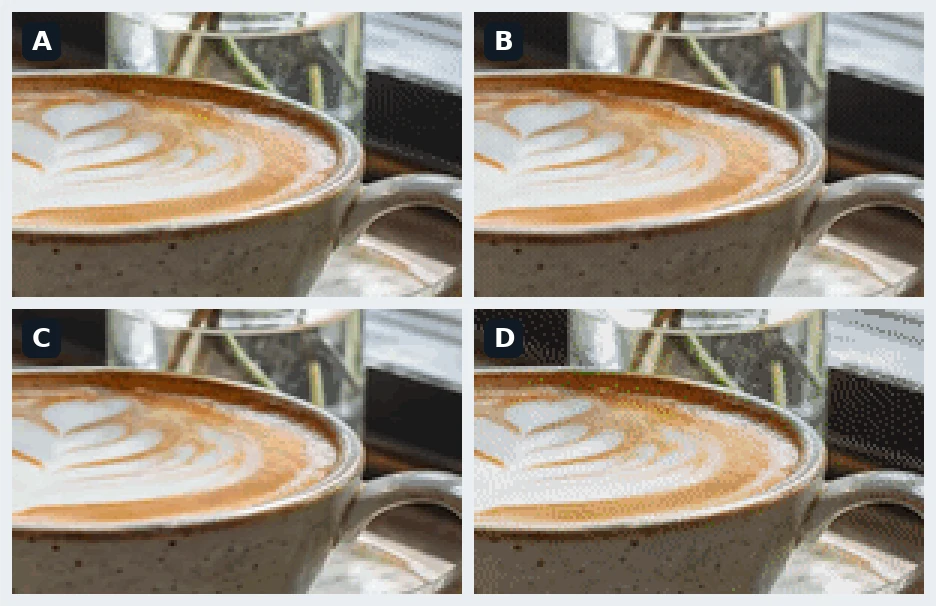
For colour-rich footage like a photo, the pattern or off settings saved 15–18% and 64 colours saved 31%. The text-and-flat-colour screen recording barely changed with dithering off, and the pattern setting actually made it 21% larger. Start with “Off” for screen recordings and graphics and “Smooth” for photos and live footage, and lower the number of colours only when the file is still too large.
How to use
- Drop a video into the window or click to choose one. On your first visit the conversion engine downloads first.
- Find the scene with the playback bar, then drag both ends of the range bar or press “Set start here” / “Set end here”. The play button loops only the selected part.
- If needed, choose a crop ratio and drag the box over the preview into place. Drag a corner to resize it.
- Pick a preset or set the width, frame rate, colours, dithering, speed and loop, check the estimate and press “Make GIF”. Review the result and download it. Making it again with other settings does not reload the video.
Ways to cut the file size
- Shorten the range first: size is almost proportional to the number of frames. The same 2 seconds at 320 px came to 1,129.0 KiB at 15 fps (30 frames) and 2,089.2 KiB at 30 fps (60 frames). Removing a second is the surest saving.
- Width grows with the pixel count: cropping 480×270 to a 1:1 480×480 meant 1.78 times the pixels and 1.70 times the file size. For chat apps and comments, 320–480 px is plenty.
- 10–15 frames per second is enough: motion generally starts to look smooth around 12 fps, and 30 fps is almost twice as heavy as 15 fps. Explanatory screen recordings stay readable at 8–10 fps.
- Speed up long scenes: a 10-second scene at 2× becomes a 5-second GIF, fitting the whole scene into roughly the same size (5,373.8 KiB) as a normal-speed 5-second section with the same settings.
- Crop out the motion you do not need: a shaking background or a scene cut makes every frame be stored again. Cropping so only the moving part remains reduces both the pixel count and the changing area.
Frequently asked questions
Is the sound included?
No. The GIF format cannot hold sound, so the audio is removed. If you need sound, make a short MP4 in the video converter instead; for the same scene an MP4 is much smaller than a GIF.
Why is the GIF bigger than the original video?
GIF is an image format from 1987 that stores each frame as a losslessly compressed picture of up to 256 colours. It cannot predict motion and store only small differences the way modern video codecs do. In this site's own measurement, a GIF of a 10-second clip (480 px, 12 fps) was 5.7 times the size of the standard-quality MP4, which is why GIFs should be short and small.
Can I make a GIF with a transparent background?
Ordinary videos such as MP4 carry no transparency, so the result is an opaque GIF. This tool has no option to make a colour transparent or remove the background. For a transparent animation, use an editor that handles transparency.
What about upload limits on chat apps and forums?
Each service has its own limits on GIF file size and dimensions, and they change often, so check the current rules in the help pages of the place you are posting to. If you are over the limit, shorten the range first, then try the “Light” preset or a 320 px width, which usually cuts the size a lot. Some services also recompress uploaded GIFs or show them as video.
I added a file but there is no preview.
To choose the range and crop, your browser has to be able to play the video. For files it cannot play, such as some AVI or MKV files or MOV files saved in HEVC, convert them to MP4 in the video converter first and then open them here. Recent Chrome and Edge open most MP4 and WEBM files directly.
Does it work with long videos? How long does it take?
There is no fixed limit on the source length, but the whole source file is loaded into browser memory and only the chosen range is converted. In our measurements a 5-second range took 0.6–8.3 seconds, and it grows with a longer range and a larger size. On a phone a large source may run out of memory, so use a computer or make the source smaller first.