
Thumbnail ratios and cropping: we cut a 16:9 thumbnail to 1:1, 4:5 and 9:16
When a 16:9 YouTube thumbnail is reused for Instagram posts (1:1, 4:5) or Shorts and Reels (9:16), the most important part, the title, often gets cut off. For this guide we cropped a typical thumbnail, with a big title on the left and a food photo on the right, to each ratio to see what survives, and measured how file size changes with the save format.
The short answer
- Centre crops of the 16:9 thumbnail cut off the title on the left. If you plan to reuse it in several ratios, keep the title and faces within the central third.
- For an existing thumbnail, move the X position toward the important element instead of cropping from the centre.
- A 1920×1080 PNG was 3.75 MiB, over YouTube's 2 MB mobile upload limit. Saved as JPEG 85% it was 361 KiB.
- YouTube Help currently recommends 3840×2160 with a minimum width of 640 px for video thumbnails (checked 2026-09-18).
Ratio and pixel size are different settings
16:9 is a ratio of width to height; 1280×720 is an actual pixel count. 1280×720, 1920×1080 and 3840×2160 are all 16:9. Cropping cuts an area out of the original; resizing changes the total number of pixels. If you want a 1080×1080 square, crop to 1:1 first, then resize to 1080×1080.
Platform recommendations (YouTube Help, checked 2026-09-18)
| Item | Recommendation |
|---|---|
| Video thumbnail | 16:9, 3840×2160 recommended, minimum width 640 px |
| Shorts thumbnail | 9:16, 2160×3840 recommended, minimum height 640 px |
| Podcast playlists | 1:1 |
| File format | JPG, PNG and similar |
| Size limit | 2 MB when uploading from mobile (10 MB for podcasts), 50 MB from desktop |
| 16:9 thumbnail on a vertical video | May be replaced by an auto-generated 4:5 thumbnail on Home, Explore and Subscriptions |
Platform specs change often; check the service's latest help pages before uploading.
How we tested
We generated a 2688×1520 cooking-video thumbnail with a GPT image model: a “초간단” (super easy) badge and the big title “5분 크림 파스타” (5-minute cream pasta) on the left, a pasta photo on the right. We trimmed 4 px from top and bottom to get an exact 16:9 (2688×1512), downsized it in the browser the same way as this site's image converter (canvas) to 1280×720 and 1920×1080, and saved PNG, JPEG 85% and WEBP 85%. Crops were calculated on the 1280×720 result. Environment: Chromium 152 on Windows, September 2026.
Result 1 — What survives a centre crop
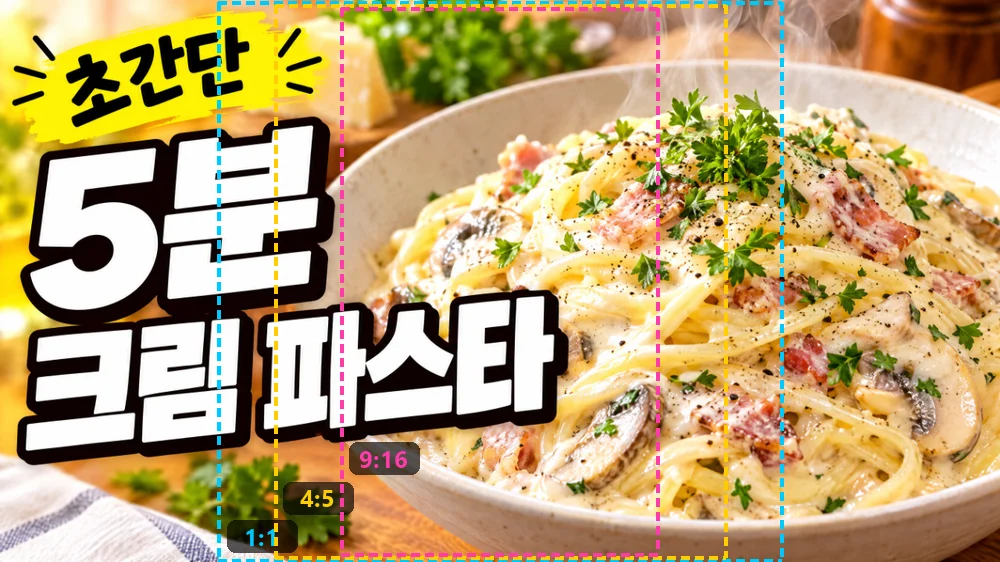
| Ratio | Crop size on 1280×720 | Centred X | Share of width kept |
|---|---|---|---|
| 1:1 | 720×720 | 280 | 56.3% |
| 4:5 | 576×720 | 352 | 45.0% |
| 9:16 | 405×720 | 437 (437.5) | 31.6% |
X is (1280 − crop width) ÷ 2. A 9:16 crop keeps less than a third of the width, so a centre crop leaves only the middle of the pasta bowl.
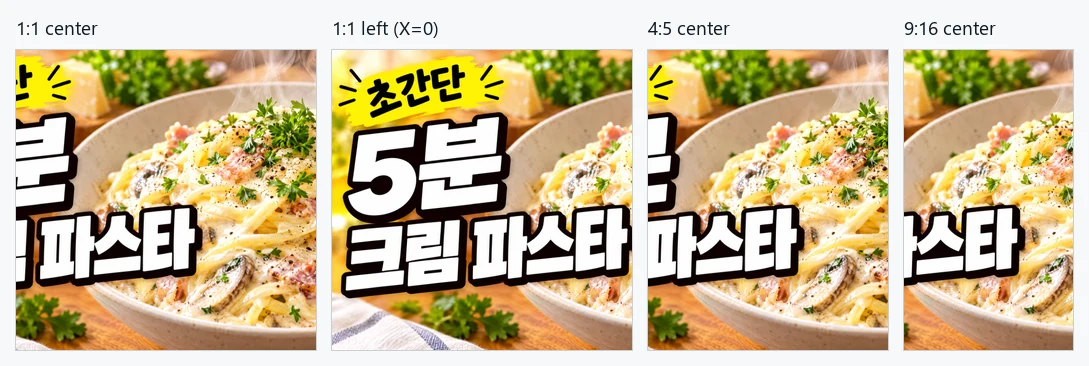
In the centred 1:1 crop the beginning of each title line was cut, and in 4:5 and 9:16 the title was barely readable. The same 1:1 crop moved to X=0 kept the badge and the whole title at the cost of part of the pasta. Don't stop at choosing a ratio in the crop tool; move X toward the important element and check.
Result 2 — File size by format
| Size | PNG | JPEG 85% | WEBP 85% |
|---|---|---|---|
| 1280×720 | 1,850.9 KiB | 190.0 KiB | 140.0 KiB |
| 1920×1080 | 3,843.8 KiB | 360.7 KiB | 257.8 KiB |
PNG is very large for photographic thumbnails. The 1920×1080 PNG exceeded YouTube's 2 MB mobile upload limit, and the 1280×720 PNG came close. YouTube Help names JPG and PNG as examples, so JPEG 85% is the safest choice for thumbnails. WEBP was smaller, but some services don't accept it for uploads, so check first.
The recommended resolution is 3840×2160, but enlarging beyond your original does not add sharpness. If your footage or design file is large, export large; if not, upload at the original size.
Designing a thumbnail for several ratios
- Set a safe area from the start. On 1280×720, the central X=437–842 (405 px wide) survives a centred 1:1, 4:5 or 9:16 crop. Keep the title and faces close to it.
- Crop each ratio separately. Choose a ratio preset in the image crop tool, then adjust X and Y so the important elements fit. Turn on the lock to keep the same values for the next image.
- Resize to the final size. Put the crop into the image converter, set the pixel dimensions and save as JPEG 85%.
- Check it in place. After uploading, make sure the text is readable in a phone list view and not hidden by the duration badge or buttons.
Cropping to exact pixels
To cut a centred 1280×720 from the image crop tool's 1600×1200 sample, choose Free ratio, enter width 1280 and height 720, and press Centre. That gives X = (1600 − 1280) ÷ 2 = 160 and Y = (1200 − 720) ÷ 2 = 240. Because it cuts part of the original without enlarging, the result is exactly 1280×720. If the original is smaller than the target, the area is limited to the image, so check the numbers before saving.
Common mistakes
- Matching the ratio but not the pixel size: a 16:9 image under 640 px wide misses YouTube's minimum.
- Uploading photographic thumbnails as PNG: easy to hit the size limit.
- Placing text near the edges: it gets cropped in other ratios or covered by the duration badge.
- Enlarging a small original: it only gets blurrier.
How these tools work and their limits
The image crop tool and image converter both run in your browser; the original file is not changed or uploaded. PNG saves the cropped pixels losslessly, while JPEG and WEBP re-compress at the chosen quality, so zoom in around text to check. The sizes above are for this test image and vary with content.
References
Try cropping in the image crop tool · Image converter · All guides